Safety Management
Simplifying managing data across different
divisions
EnsafeNxt is a safety management intranet
platform for TATA steel
PRoject date
November 2022 - April 2024
My Role
Qualitative & Quantitative Research
Conceptualization
Design
Dev handoff
Project TYPE
UX Design
UI Design

Safety Management
Safety Management
Simplifying managing data across different divisions
Simplifying managing data across different divisions
EnsafeNxt is a safety management intranet platform
for TATA steel
EnsafeNxt is a safety management intranet platform
for TATA steel
Project date
November 2022 - April 2024
My Role
Qualitative & Quantative Research
Conceptualization
Design
Dev handoff
Project Type
UX Design
UI Design
Project date
November 2022 - April 2024
My Role
Qualitative & Quantative Research
Conceptualization
Design
Dev handoff
Project Type
UX Design
UI Design
About Platfrom
About Platfrom
About Platfrom
This Intranet Portal Centralizes All Safety Management Activities Across The Company. It’s Used By Employees To CXOs For Logging Incidents, Tracking Issue Resolution, And Generating Safety Data. The Insights Help Upgrade Protocols And Guide Strategic Safety Decisions.
This Intranet Portal Centralizes All Safety Management Activities Across The Company. It’s Used By Employees To CXOs For Logging Incidents, Tracking Issue Resolution, And Generating Safety Data. The Insights Help Upgrade Protocols And Guide Strategic Safety Decisions.
This Intranet Portal Centralizes All Safety Management Activities Across The Company. It’s Used By Employees To CXOs For Logging Incidents, Tracking Issue Resolution, And Generating Safety Data. The Insights Help Upgrade Protocols And Guide Strategic Safety Decisions.

EnsafeNxt
EnsafeNxt
Design Process Timeline
Design Process Timeline
A visual representation showcasing the entire process from ideation, planning, and creation to execution, feedback, and performance measurement. It highlights each phase's flow, interconnections, and key milestones.
A visual representation showcasing the entire process from ideation, planning, and creation to execution, feedback, and performance measurement. It highlights each phase's flow, interconnections, and key milestones.
Ideation & Desk Research
Interview with Nutritionist & Users
User Flows & Journeys
Wireframe
Stakeholder Feedback
Stakeholder Feedback
UI Design
Iterations
Development
Launch In Phases
Measuring Success Metrics
Figma
Adobe

Notion
Pen & Paper
And a lot of spotify music
Ideation & Desk Research
Interview with Nutritionist & Users
User Flows & Journeys
Wireframe
Stakeholder Feedback
Stakeholder Feedback
UI Design
Iterations
Development
Launch In Phases
Measuring Success Metrics
Figma
Adobe
Notion
Pen & Paper
And a lot of spotify music
User Research
User Research
Primary Qualitative Research
Primary Qualitative Research
3
Behaviour Analysis
User Were Gently Prompted To Self-Initiate Screen Sharing And Perform Tasks On Ensafe, Like Taking A Data Dump Or Accessing The Safety Observation Log.
User Were Shown A Series Of Ensafe Snapshots To I dentify Familiar Restrictions While Designing EnsafeNxt.
12
Recall Activity
One-To-One Discussions Were Conducted to Uncover Isolated Issues, Focusing On The Business Perspective, Such As Workflow Bottlenecks Or Reporting Challenge.
3
Interviews
6
Focus Group Discussion
User Were Shown A Series Of Ensafe Snapshots To Identify Familiar Restrictions While Designing EnsafeNxt.
3
Behaviour Analysis
User Were Gently Prompted To Self-Initiate Screen Sharing And Perform Tasks On Ensafe, Like Taking A Data Dump Or Accessing The Safety Observation Log.
User Were Shown A Series Of Ensafe Snapshots To I dentify Familiar Restrictions While Designing EnsafeNxt.
12
Recall Activity
One-To-One Discussions Were Conducted to Uncover Isolated Issues, Focusing On The Business Perspective, Such As Workflow Bottlenecks Or Reporting Challenge.
3
Interviews
6
Focus Group Discussion
User Were Shown A Series Of Ensafe Snapshots To Identify Familiar Restrictions While Designing EnsafeNxt.
Who uses EnsafeNxt
Who uses EnsafeNxt
Who uses EnsafeNxt
Line Managers
IL3 above level officers conduct line walks
Assistant Manager
Records observations and updates FRCPs
Safety Officers
Reviews observations, tracks overdue items, and handles FRCPs (Fidelity Risk Control Program)
Senior Manager
Takes actions and logs information
Safety Professionals
Handles contractors
Head of Departments
Handles escalations and actions, as well as team formation;Rewards
Chief of Safety
Makes improvements and recommendations of the reports, releases rewards
Line Managers
IL3 above level officers conduct line walks
Assistant Manager
Records observations and updates FRCPs
Safety Officers
Reviews observations, tracks overdue items, and handles FRCPs (Fidelity Risk Control Program)
Senior Manager
Takes actions and logs information
Safety Professionals
Handles contractors
Head of Departments
Handles escalations and actions, as well as team formation;Rewards
Chief of Safety
Makes improvements and recommendations of the reports, releases rewards
Line Managers
IL3 above level officers conduct line walks
Assistant Manager
Records observations and updates FRCPs
Safety Officers
Reviews observations, tracks overdue items, and handles FRCPs (Fidelity Risk Control Program)
Senior Manager
Takes actions and logs information
Safety Professionals
Handles contractors
Head of Departments
Handles escalations and actions, as well as team formation;Rewards
Chief of Safety
Makes improvements and recommendations of the reports, releases rewards
Line Managers
IL3 above level officers conduct line walks
Assistant Manager
Records observations and updates FRCPs
Safety Officers
Reviews observations, tracks overdue items, and handles FRCPs (Fidelity Risk Control Program)
Senior Manager
Takes actions and logs information
Safety Professionals
Handles contractors
Head of Departments
Handles escalations and actions, as well as team formation;Rewards
Chief of Safety
Makes improvements and recommendations of the reports, releases rewards
Line Managers
Assistant Manager
Safety Officers
Senior Manager
Safety Professionals
Head of Departments
Chief of Safety
User Needs
User Needs
User Needs


MIS should be easy to sort.
Chief Safety - Tata Steel India
Recall of tasks were drastically low. Learning curve for new users required multiple training sessions.
Line Management - Sr. Manager
CSM have 7 stages but it did not show in which stage observation is pending.
User Safety Professionals
Ensafe should be a total data system, from employment to the activities one person is performing.
Line Management - Head
Design consistency and visibility in terms of action items and actionable items have a tendency to be hidden away.
Line Management - Asst. Manager
The data visibility and navigation of the system created a issues while quick decision making.
Line Management - Manager
MIS should be easy to sort.
Chief Safety - Tata Steel India
Recall of tasks were drastically low. Learning curve for new users required multiple training sessions.
Line Management - Sr. Manager
CSM have 7 stages but it did not show in which stage observation is pending.
User Safety Professionals
Ensafe should be a total data system, from employment to the activities one person is performing.
Line Management - Head
Design consistency and visibility in terms of action items and actionable items have a tendency to be hidden away.
Line Management - Asst. Manager
The data visibility and navigation of the system created a issues while quick decision making.
Line Management - Manager
Line Management - Head
Ensafe should be a total data system, from employment to the activities one person is performing.
Line Management - Manager
The data visibility and navigation of the system created a issues while quick decision making.
Line Management - Asst. Manager
Design consistency and visibility in terms of action items and actionable items have a tendency to be hidden away.
Chief Safety - Tata Steel India
MIS should be easy to sort.
User Safety Professionals
CSM have 7 stages but it did not show in which stage observation is pending.
Line Management - Sr. Manager
Recall of tasks were drastically low. Learning curve for new users required multiple training sessions.
We were right
Open-ended question format
Organisation Unit Visibility is flawed and in data provied.
The portal is not giving any output as it should be; it is more of a Data mining system at the moment.
ADID logged in once should stay logged in on ensafe. multiple logins are futile and waste time.
We were right
Open-ended question format
Navigation through the portal is highly different for each role, and their behaviour through the portal is very different from each other.
Home and back buttons are missing at the moment, which creates additional problems in navigation
We were right
Open-ended question format
Everyone Is using The Images They Capture As A "Log" Memory. And The Entire Team Logs The Same Element.
There Are No Auto-Save Or Draft Option Now.
Department And Region Specification Are Missing At The Dashboard.
We were right
Open-ended question format

We were right
Open-ended question format
Navigation through the portal is highly different for each role, and their behaviour through the portal is very different from each other.
Home and back buttons are missing at the moment, which creates additional problems in navigation
We were right
Open-ended question format

Secondary Research
Secondary Research
Secondary Research
Between November 2023 to February 2024
Complex Navigation
Users agreed that existing Ensafe is difficult to navigate through
Data Duplication Issues
Users and stakeholder are concerned about duplicity of data
Ineffective Notifications
Notification nd email alerts are not always useful for professionals other than heads and Chief Of Safety
Cumbersome File Uploads
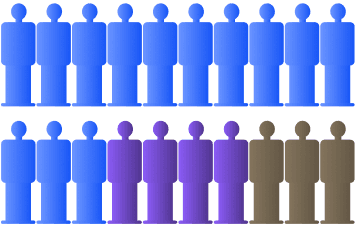
Uploading attachment is a long task with multiple errors for 65% users

Ease of uploading attachements
Difficult
Easy
Not a hassle
Each man represent 20%
Navigating through Ensafe portal on a day-to-day basis’

Difficult
Easy
Each man represent 20%
100%
75%
95%
95%
Complex Navigation
Users agreed that existing Ensafe is difficult to navigate through
Ineffective Notifications
Notification and email alerts are not always useful for professional other than heads and chief of safety
Uploading attachment is a long task with multiple errors for 65% users
Cumbersome File Uploads
User and stakeholder are concerned about duplicity of data
Cumbersome File Uploads
Between November 2023 to February 2024
Ease of uploading attachements
Navigating through Ensafe portal on a day-to-day basis’
Difficult
Easy
Not a hassle
Difficult
Not a hassle
Each man represent 20%
Each man represent 20%
100%
75%
95%
95%
Complex Navigation
Data duplicate issues
Cumbersome file uploads
Ineffective notifications
Between November 2023 to February 2024
Ease of uploading attachements
Difficult
Easy
Not a hassle
Each man represent 20%
Each man represent 20%
Navigating through Ensafe portal on a day-to-day basis’
Difficult
Easy
What Did They Wanted To Say
01
User Motivation
They want to get their jobs done fast and easy. Since they've used the system for 2+ years, they have established habits but need efficiency.
02
Efficiency Challenges
“Professionals are habituated to the portal, yet they struggle to find time for data entry while memories are fresh”
03
Navigation Hurdles
"The left navigation is responsive but underutilized; only 2 out of 12 users knew it could be expanded."
04
Reporting & Data
"MIS Reports are dysfunctional due to lack of sorting/filtering. Systems often expire in 2 mins without saving data."
What Did They Wanted To Say
01
User Motivation
They want to get their jobs done fast and easy. Since they've used the system for 2+ years, they have established habits but need efficiency.
02
Efficiency Challenges
“Professionals are habituated to the portal, yet they struggle to find time for data entry while memories are fresh”
03
Navigation Hurdles
"The left navigation is responsive but underutilized; only 2 out of 12 users knew it could be expanded."
04
Reporting & Data
"MIS Reports are dysfunctional due to lack of sorting/filtering. Systems often expire in 2 mins without saving data."
We were right
Open-ended question format
We were right
Open-ended question format
Navigation through the portal is highly different for each role, and their behaviour through the portal is very different from each other.
Home and back buttons are missing at the moment, which creates additional problems in navigation
We were right
Open-ended question format
TASK FLOWS
TASK FLOWS
TASK FLOWS
We took multiple sessions with groups and individual users to understand their task flows. We had multiple versions of the task flows which were combined to form the following task flow, used consistently in the portal.
We took multiple sessions with groups and individual users to understand their task flows. We had multiple versions of the task flows which were combined to form the following task flow, used consistently in the portal.
We took multiple sessions with groups and individual users to understand their task flows. We had multiple versions of the task flows which were combined to form the following task flow, used consistently in the portal.
Logging an observation
The user is required to take the first step into the work process using this section. Everything that is required to be logged and reported comes in this section.
Visit a work site
Take notes/obs
Open portal
Select Module
Log Observation
Submit
Taking action on an observation
Once the log/reported is submitted then some action is triggered against the person responsible who will find their assigned tasks in this section.
Start office work
Check Email
Take Action based on email
Redirect to portal
Creating reports on record & respond
For people wanting to gather insights out of the data logged and action taken in record and respond parts. This section contains all the MIS and analysed data.
Open portal
Select Module
Open MIS/Data Summary
Data Analysis
Create report
Logging an observation
The user is required to take the first step into the work process using this section. Everything that is required to be logged and reported comes in this section.
Visit a work site
Take notes/obs
Open portal
Select Module
Log Observation
Submit
Taking action on an observation
Once the log/reported is submitted then some action is triggered against the person responsible who will find their assigned tasks in this section.
Start office work
Check Email
Take Action based on email
Redirect to portal
Creating reports on record & respond
For people wanting to gather insights out of the data logged and action taken in record and respond parts. This section contains all the MIS and analysed data.
Open portal
Select Module
Open MIS/Data Summary
Data Analysis
Create report
Logging an observation
The user is required to take the first step into the work process using this section. Everything that is required to be logged and reported comes in this section.
Visit a work site
Take notes/obs
Open portal
Select Module
Log Observation
Submit
Taking action on an observation
Once the log/reported is submitted then some action is triggered against the person responsible who will find their assigned tasks in this section.
Start office work
Check Email
Take Action based on email
Redirect to portal
Creating reports on record & respond
For people wanting to gather insights out of the data logged and action taken in record and respond parts. This section contains all the MIS and analysed data.
Open portal
Select Module
Open MIS/Data Summary
Data Analysis
Create report
Final Design Direction
Final Design Direction
Building on the early wireframe, we translated concepts into functional interfaces while balancing user needs with development feasibility
Building on the early wireframe, we translated concepts into functional interfaces while balancing user needs with development feasibility
Consistent patterns: Standardized interactions across modules to improve recall and reduce the learning curve.
Better visibility: Made actions, KPIs, and safety data easier to find and understand.
Simpler workflows: Reduced unnecessary steps to help users complete tasks faster.
Role-based task hierarchy: Bucketed tasks into three levels - IL3 users who record tasks, managers who respond, and department heads who review performance through MIS and reports.
Relevant information: Made sections visible only to the roles responsible for them, reducing clutter and improving visibility.
Clear workflows: Structured the experience around Record - Respond - Review.

Consistent patterns: Standardized interactions across modules to improve recall and reduce the learning curve.
Better visibility: Made actions, KPIs, and safety data easier to find and understand.
Simpler workflows: Reduced unnecessary steps to help users complete tasks faster.
Role-based task hierarchy: Bucketed tasks into three levels - IL3 users who record tasks, managers who respond, and department heads who review performance through MIS and reports.
Relevant information: Made sections visible only to the roles responsible for them, reducing clutter and improving visibility.
Clear workflows: Structured the experience around Record - Respond - Review.
How To Record? - Make capturing information easy
How To Record? - Make capturing information easy
User needed to enter records when they had limited time, while the existing log screens could expire after 2 minutes without saving their progress. this forced users to start over and made data entry frustrating
User needed to enter records when they had limited time, while the existing log screens could expire after 2 minutes without saving their progress. this forced users to start over and made data entry frustrating
Go to the particular observation site & upload all the related photos there.

12
Function
Manufracturing
Corporate Assistance Order
Type Member’s Name
Shushil Yadav
Simple Kaur
Hetal Kanojia
Kirtiman Kumar
TSK-KSLIUWK-8798NVBNMB
Home Services and Help
C3
23-Oct-2023
Assessment Date & Year
Assessment Cycle
Assessment Group
Assessment ID
Division
Member
Department
Fill Observation Details
Upload Pictures (can upload multiple pictures)


+3
Log Report: Observations
5SVWM28739180
EnsafeNxt
Faster, simpler and more focused way to capture observation
EnsafeNxt
12
Ansuman Mohanty
Log Report: Observations


IMG -1


Brief Description
Write a description here
Keep the text specific, mention unique adjectives.
Section
Select Section
Location
Type Location
Assessment Criteria
Select Assessment Criteria
Assessment Criteria Element
Select Assessment Criteria Element
Observation Type
Good
OFI
Repeat Observation
Yes
No
Is it a Best Practice?
Yes
No
30
Pending Observations
Log Report
Submit Report
All observations in one place
Images related to the area/module are shown together so users can quickly browse and select the right observation without navigating away.
Focused, clean form
Only essential fields are shown to help users capture the observation faster with less effort.
Context at a glance
Selected image is shown large at the top so users always have the right context while filling the details.
Preview before submit
Users can review all details before final submission, reducing errors and rework.
Save as Draft
Users can save their progress and return later without losing data.
Clear primary action
The primary action is highlighted to make the next step obvious.
Save & Next
Makes it quick and easy to record multiple observations sequentially.
Go to the particular observation site & upload all the related photos there.
12
Function
Manufracturing
Corporate Assistance Order
Type Member’s Name
Shushil Yadav
Simple Kaur
Hetal Kanojia
Kirtiman Kumar
TSK-KSLIUWK-8798NVBNMB
Home Services and Help
C3
23-Oct-2023
Assessment Date & Year
Assessment Cycle
Assessment Group
Assessment ID
Division
Member
Department
Fill Observation Details
Upload Pictures (can upload multiple pictures)


+3
Log Report: Observations
5SVWM28739180
EnsafeNxt
Faster, simpler and more focused way to capture observation
EnsafeNxt
12
Ansuman Mohanty
Log Report: Observations
IMG -1
Brief Description
Write a description here
Keep the text specific, mention unique adjectives.
Section
Select Section
Location
Type Location
Assessment Criteria
Select Assessment Criteria
Assessment Criteria Element
Select Assessment Criteria Element
Observation Type
Good
OFI
Repeat Observation
Yes
No
Is it a Best Practice?
Yes
No
30
Pending Observations
Log Report
Submit Report
All observations in one place
Images related to the area/module are shown together so users can quickly browse and select the right observation without navigating away.
Focused, clean form
Only essential fields are shown to help users capture the observation faster with less effort.
Context at a glance
Selected image is shown large at the top so users always have the right context while filling the details.
Preview before submit
Users can review all details before final submission, reducing errors and rework.
Save as Draft
Users can save their progress and return later without losing data.
Clear primary action
The primary action is highlighted to make the next step obvious.
Save & Next
Makes it quick and easy to record multiple observations sequentially.
How to Record? - Make capturing information easy
Users needed to enter records when they had limited time, while the existing log screens could expire after 2 minutes without saving their progress. This forced users to start over and made data entry frustrating
12
Function
Manufracturing
Corporate Assistance Order
Type Member’s Name
Shushil Yadav
Simple Kaur
Hetal Kanojia
Kirtiman Kumar
TSK-KSLIUWK-8798NVBNMB
Home Services and Help
C3
23-Oct-2023
Assessment Date & Year
Assessment Cycle
Assessment Group
Assessment ID
Division
Member
Department
Fill Observation Details
Upload Pictures (can upload multiple pictures)


+3
Log Report: Observations
5SVWM28739180
EnsafeNxt
Faster, simpler and more focused way to capture observations with context-aware screen layouts.
EnsafeNxt
12
Ansuman Mohanty
Log Report: Observations



IMG -1

Brief Description
Write a description here
Keep the text specific, mention unique adjectives.
Section
Select Section
Location
Type Location
Assessment Criteria
Select Assessment Criteria
Assessment Criteria Element
Select Assessment Criteria Element
Observation Type
Good
OFI
Repeat Observation
Yes
No
Is it a Best Practice?
Yes
No
30
Pending Observations
Log Report
Submit Report
All observations in one place
Images related to the area/module are shown together so users can quickly browse and select the right observation without navigating away.
Context at a glance
Selected image is shown large at the top so users always have the right context while filling the details.
Focused, clean form
Only essential fields are shown to help users capture the observation faster with less effort.
Preview before submit
Users can review all details before final submission, reducing errors and rework.
Save as Draft
Users can save their progress and return later without losing data.
Clear primary action
The primary action is highlighted to make the next step obvious.
Save & Next
Makes it quick and easy to record multiple observations sequentially.
Go to the particular observation site & upload all the related photos there.
How To Respond? - Make actions visible and actionable
How To Respond? - Make actions visible and actionable
How To Respond? - Make actions visible and actionable
Users had difficulty keeping track of pending observations, and notifications/emails were not always useful. Safety professionals specifically wanted to know which stage an observation was pending in.
Users had difficulty keeping track of pending observations, and notification/emails were not always useful. Safety professionals specifically wanted to know which stage an observation was pending in.
Users had difficulty keeping track of pending observations, and notification/emails were not always useful. Safety professionals specifically wanted to know which stage an observation was pending in.
Department
TSJ-KHS-HVJB-JHHJ
Assessment Year
FY2023
Assessment Cycle
C3
Assessment ID
PHS656866
Function
Service Function
Mentor
Leader
Alt. Leader
Convenor(s)
Members


30 Observation
Before Picture
Observation ID
SVWM4324532124
Location
Jamshedpur
Observation Type
Good
Observation Comment

Comment after Improvement
Write response description here
Upload After Picture
JPEG, PNG, JPG or PDF (max. 10MB)
Assessment Observation Closure
Assessment Observation Closure
Action Taken Report Submission
Assessment Observation
(30)

Pipe leakage
VVM-345
C2
Due Today

Electrical Panel
TSJ-PLS
C3
Due Tomorrow

Machine Guard
VVM-922
C1
Due Today

Safety Gear
TSJ-778
C2
Overdue

IMG-1
BVM-26-HV-8-JFU4
C3
Overdue

Assigned Tasks on One View
All observations assigned to the user are listed on the left, making it easy to find and manage pending tasks.
Clear Task Information
Shows key details (image + department) at a glance, so users can quickly understand the context.
Focused Response Section
Users can add remarks/comments and attach proof of action in a single, streamlined area — no need to navigate away.
All Key Details at a Glance
Relevant observation information (department, assessment cycle, ID, and people involved) is shown clearly, so users have full context before taking action.
Visual Context
Large image with thumbnails provides clear visual context, making it faster to identify the issue being addressed.
Structured Response Form
A clean, focused form with a clear comment section and drag-and-drop upload makes it easy to provide remarks and add proof of action.
Department
TSJ-KHS-HVJB-JHHJ
Assessment Year
FY2023
Assessment Cycle
C3
Assessment ID
PHS656866
Function
Service Function
Mentor
Leader
Alt. Leader
Convenor(s)
Members

30 Observation
Before Picture
Observation ID
SVWM4324532124
Location
Jamshedpur
Observation Type
Good
Observation Comment

Comment after Improvement
Write response description here
Upload After Picture
JPEG, PNG, JPG or PDF (max. 10MB)
Assessment Observation Closure
Assessment Observation Closure
Action Taken Report Submission
Department
TSJ-KHS-HVJB-JHHJ
Assessment Year
FY2023
Assessment Cycle
C3
Assessment ID
PHS656866
Function
Service Function
Mentor
Leader
Alt. Leader
Convenor(s)
Members
30 Observation
Before Picture
Observation ID
SVWM4324532124
Location
Jamshedpur
Observation Type
Good
Observation Comment
Comment after Improvement
Write response description here
Upload After Picture
JPEG, PNG, JPG or PDF (max. 10MB)
Assessment Observation Closure
Assessment Observation Closure
Action Taken Report Submission
Assessment Observation
(30)
Pipe leakage
VVM-345
C2
Due Today
Electrical Panel
TSJ-PLS
C3
Due Tomorrow
Machine Guard
VVM-922
C1
Due Today
Safety Gear
TSJ-778
C2
Overdue
IMG-1
BVM-26-HV-8-JFU4
C3
Overdue
Assigned Tasks on One View
All observations assigned to the user are listed on the left, making it easy to find and manage pending tasks.
Clear Task Information
Shows key details (image + department) at a glance, so users can quickly understand the context.
Focused Response Section
Users can add remarks/comments and attach proof of action in a single, streamlined area — no need to navigate away.
All Key Details at a Glance
Relevant observation information (department, assessment cycle, ID, and people involved) is shown clearly, so users have full context before taking action.
Visual Context
Large image with thumbnails provides clear visual context, making it faster to identify the issue being addressed.
Structured Response Form
A clean, focused form with a clear comment section and drag-and-drop upload makes it easy to provide remarks and add proof of action.
Department
TSJ-KHS-HVJB-JHHJ
Assessment Year
FY2023
Assessment Cycle
C3
Assessment ID
PHS656866
Function
Service Function
Mentor
Leader
Alt. Leader
Convenor(s)
Members
30 Observation
Before Picture
Observation ID
SVWM4324532124
Location
Jamshedpur
Observation Type
Good
Observation Comment
Comment after Improvement
Write response description here
Upload After Picture
JPEG, PNG, JPG or PDF (max. 10MB)
Assessment Observation Closure
Assessment Observation Closure
Action Taken Report Submission
Department
TSJ-KHS-HVJB-JHHJ
Assessment Year
FY2023
Assessment Cycle
C3
Assessment ID
PHS656866
Function
Service Function
Mentor
Leader
Alt. Leader
Convenor(s)
Members
30 Observation
Before Picture
Observation ID
SVWM4324532124
Location
Jamshedpur
Observation Type
Good
Observation Comment
Comment after Improvement
Write response description here
Upload After Picture
JPEG, PNG, JPG or PDF (max. 10MB)
Assessment Observation Closure
Assessment Observation Closure
Action Taken Report Submission
Assessment Observation
(30)
Pipe leakage
VVM-345
C2
Due Today
Electrical Panel
TSJ-PLS
C3
Due Tomorrow
Machine Guard
VVM-922
C1
Due Today
Safety Gear
TSJ-778
C2
Overdue
IMG-1
BVM-26-HV-8-JFU4
C3
Overdue
All Key Details at a Glance
Relevant observation information (department, assessment cycle, ID, and people involved) is shown clearly, so users have full context before taking action.
Visual Context
Large image with thumbnails provides clear visual context, making it faster to identify the issue being addressed.
Structured Response Form
A clean, focused form with a clear comment section and drag-and-drop upload makes it easy to provide remarks and add proof of action.
Department
TSJ-KHS-HVJB-JHHJ
Assessment Year
FY2023
Assessment Cycle
C3
Assessment ID
PHS656866
Function
Service Function
Mentor
Leader
Alt. Leader
Convenor(s)
Members
30 Observation
Before Picture
Observation ID
SVWM4324532124
Location
Jamshedpur
Observation Type
Good
Observation Comment
Comment after Improvement
Write response description here
Upload After Picture
JPEG, PNG, JPG or PDF (max. 10MB)
Assessment Observation Closure
Assessment Observation Closure
Action Taken Report Submission
How To Review? - Turn collected data into useful insights
How To Review? - Turn collected data into useful insights
Users needed to enter records when they had limited time, while the existing log screens could expire after 2 minutes without saving their progress. This forced users to start over and made data entry frustrating
Users needed to enter records when they had limited time, while the existing log screens could expire after 2 minutes without saving their progress. This forced users to start over and made data entry frustrating

Global Filters
Across key parameters
(year, division, department,
cycle), users can quickly
refine the data they need.
Visual Insights
Charts and graphs make it easy to understand key trends and identify areas requiring attention.
Clear Hierarchy
Information is organized
logically – from overall Division view to Department and Section level – for easier navigation and context.
Export & Report Generation
Users can download
filtered data and create reports instantly – saving time and effort
for further analysis.
From scattered reports to aclear, actionable overview
Global Filters
Across key parameters
(year, division, department,
cycle), users can quickly
refine the data they need.
Visual Insights
Charts and graphs make it easy to understand key trends and identify areas requiring attention.
Clear Hierarchy
Information is organized
logically – from overall Division view to Department and Section level – for easier navigation and context.
Export & Report Generation
Users can download
filtered data and create reports instantly – saving time and effort
for further analysis.
From scattered reports to aclear, actionable overview
Users needed to enter records when they had limited time, while the existing log screens could expire after 2 minutes without saving their progress. This forced users to start over and made data entry frustrating
How to Review? - Turn collected data into useful insights
Select Division
Select Department
Company-Division 1
TSK-P
1
OMQ
2
Jharia..
5
FAMD
4
RM....
10
West B.
1
TSJ SS
2
TSK-P
5
Open
Closed
Observations
Total:
22
Total No.
1S
2S
3S
Basic Machine Condition
Visual workplace management
Compliance against safety observation
Criteria wise distribution of OFIs
Div. 1
Div. 2
Div. 3
Div. 4
Div. 5
Div. 6
Div. 7
Div. 8
Div. 9
Div. 10
Div. 11
Div. 12
0
1k
2k
3k
4k
5k
6k
No. of Repeat OFIs
Division
Department
Section
Div. 1
Div. 2
Div. 3
Div. 4
Div. 5
Div. 6
Div. 7
Div. 8
Div. 9
Div. 10
Div. 11
Div. 12
0
1k
2k
3k
4k
5k
6k
Division
Overall & Criteria wise Average & Median Scores
Median
Average
View Report
MIS
Summary
EnsafeNxt
From scattered reports to aclear, actionable overview
Global Filters
Across key parameters (year, division, department, cycle), users can quickly refine the data they need.
Visual Insights
Charts and graph make it easy to understand key trends and identify areas requiring attention.
Clear Hierarchy
Information is organized logically – from overall Division view to Department and Section level – for easier navigation and context.
Export & Report Generation
Users can download filtered data and create reports instantly –saving time and effort for further analysis.
200 + Screens
200 + Screens
200 + Screens


Positive Impact
Negative Impact
Positive Impact
Negative Impact
Positive Impact While Recording
Negative Impact
You!
Thank
EnsafeNxt
Ideation & Desk Research
Interview with Nutritionist & Users
User Flows & Journeys
Wireframe
Stakeholder Feedback
Stakeholder Feedback
UI Design
Iterations
Development
Launch In Phases
Measuring Success Metrics
Add a lot of spotify music
What Did They Wanted To Say


Final Design Direction
Building on the early wireframes, we translated concepts into functional interfaces while balancing user needs with development feasibility:
Consistent patterns: Standardized interactions across modules to improve recall and reduce the learning curve.
Role-based task hierarchy: Bucketed tasks into three levels - IL3 users who record tasks, managers who respond, and department heads who review performance through MIS and reports.
Better visibility: Made actions, KPIs, and safety data easier to find and understand.
Simpler workflows: Reduced unnecessary steps to help users complete tasks faster.
Clear workflows: Structured the experience around Record - Respond - Review.
Relevant information: Made sections visible only to the roles responsible for them, reducing clutter and improving visibility.
Assigned Tasks on One View
Images related to the area/module are shown together so users can quickly browse and select the right observation without navigating away.
All Key Details at a Glance
Selected image is shown large at the top so users always have the right context while filling the details.
Clear Task Information
Only essential fields are shown to help users capture the observation faster with less effort.
Visual Context
Users can review all details before final submission, reducing errors and rework.
Focused Response Section
Users can save their progress and return later without losing data.
Structured Response Form
The primary action is highlighted to make the next step obvious.

You!
Thank